Link:
https://dannyman.toldme.com/2007/06/01/wordpress-media-print/
I wanted to print an article from my web site, but the printing was ugly. I had previously tried to fix up my printing by adding some @media print stuff to my stylesheet, but I found it wasn’t working. Since I have free time, I spent a bunch of it thrashing my head against the wall trying to figure out what’s up researching the correct approach. Finally, I found a wordpress.org article: “Styling for Print”.
To specify a “print” stylesheet for WordPress: (more…)
1 Comment
Link:
https://dannyman.toldme.com/2007/05/30/wordpress-22/
I successfully upgraded WordPress to 2.2. I don’t bother with WordPress upgrades that often, because even the simple “Five Step” procedure can get a bit hairy. I’m still grinning at “Step 3: Overwrite Files” . . .
Step 3: Overwrite Files
Get the latest and greatest WordPress and upload it to the WordPress directory, overwriting all the files that exist there only after you have delete the old files, which is explained as follows (do not overwrite your wp-content directory or wp-config.php). Important: when upgrading from 2.0.x to 2.2, or from 2.1.x to 2.2, you will need to delete old files on the server, because several file names have changed. What if something goes wrong, you ask? Well, did you not create a backup of all files in Step 1? You can fall back upon them in the worst case scenario. Deleting your old files on the server and uploading the newer files from the new version you downloaded is an alternative which will ensure that the files on the server have been replaced for sure.
According to my “worklog” file, the process took 25 minutes: (more…)
1 Comment
Link:
https://dannyman.toldme.com/2007/05/18/fukn-quadr0/
Systems Administrators can be an uptight bunch. In the past few weeks I have twice spent some time amidst my fellow professionals. Most are nice people, a good many are inoffensively undersocialized, and a noisy minority are just flamingly obnoxious. (I have, at times, been flamingly obnoxious.) Two nights ago one of my fellows recommended Cory Doctorow’s mind-churning post-apocalyptic masterpiece “When SysAdmins Ruled the Earth” . . . I dare you to read it!
Not long ago I joined a professional mailing list, and today I thought I would chime in on the topic of mobile phone reimbursement. I received a polite note from the list moderator: my message had bounced, could I please re-sends the message as plain text only. These days I am using Gmail, which sends messages in the ubiquitous multipart/alternative format, which leads with text that is followed by a potentially-prettier HTML “alternative”.
I dug around in the preferences to see where I could set “text only” but couldn’t find anything, and took that as a sign that in 2007, even Google doesn’t care about supporting this antiquated preference. I have since noticed that you can just click “plain text” right in the tool bar while you are sending a message. But . . . well, I felt inclined to engage in the time-honored tradition of obnoxious computer experts and impose upon the guy my social-technological criticism of the status quo in the form of a well-crafted flame: (more…)
2 Comments
Link:
https://dannyman.toldme.com/2007/05/14/hopping-a-train/
So, I have a few gazillion things I would like to do, and some free time to play with. In terms of “professional development” I am looking for work, but more interesting to me is to have some time for education. I know an awful lot of things, especially about systems administration, and there are plenty of things that I don’t know, some things you would think I have done, but haven’t, and then there’s adding new stuff like learning Ruby on Rails, which could be danged handy if I choose to pursue contracting. To that end, I’ve had the “Agile Web Development with Rails” book collecting dust for a while . . . and a Macintosh desktop, to keep Unix confusing.
I’m into Chapter 3: Installing Rails, and the instructions for me don’t quite cut it, and a link they provide to Lucas Carlson’s blog no longer exists. But that needn’t stop us, because Google found me a very handy tutorial from Hivelogic: Building Ruby, Rails, Subversion, Mongrel, and MySQL on Mac OS X. It is from February and it does an excellent job of walking through the steps to fetch, build, and install the various pieces on a Macintosh, in /usr/local, like a real Unix system, and explaining all the important bits like fixing your $PATH and installing Xcode, and what the heck is sudo anyway. Stepping through the article is a breeze and you are left with a working Rails server, backed by MySQL, and the beginnings of a clue as to contemporary “best practices” like deployment-via-Capistrano. Huzzah!
In my case, I had to complete one other hurdle along the way. The “gem install rails” bit was erroring out for me when I followed the book and again with the Hivelogic article, with an error like: “Could not find rails (> 0) in any repository” . . . Google again found me an answer from Army of Evil Robots that basically boils down to:
gem update
Anyway, now I have a working Ruby setup on this computer, and I can hitch along to the next chapter, where I’ll learn to hop a freight.
I’m not sure what I might want to do with Rails, but “re-implement lnk.to” seems sort of obvious. If you are reading this and happen to have feelings about lnk.to, or link-shortening services, I welcome any thoughts, suggestions, wishes . . . thanks! -d
2 Comments
Link:
https://dannyman.toldme.com/2007/04/05/amazons-message-from-god/
So, the Amazon Associates program just opened up a really interesting beta program to the public called “Context Links.” Dave Taylor has a pretty good explanation, but the short of it is you stick a little bit of JavaScript in the bottom of your web site, and that will contact Amazon.com, check their search engine / crawler service, the Amazon.com product catalog, and then select various “key words” in your web site and link them to Amazon.com products. If a user purchases something after clicking on one of those links, as I mentioned earlier, the web site author gets a modest commission.
Just for fun, I thought I would give it a try. If you notice any links with a dashed line underneath, that is the Context Links in action. The first thing I noticed is that Adblock Plus will block the context links from appearing. That is probably just as well, but I wonder if there might be a point to writing say, a WordPress plugin to do the processing on the server. I also can not help but wonder if Amazon would look to create context-links specific to a customer’s tastes, so they would prefer to do the highlighting on the client-side.
Anyway, it is kind of fun to see what choices the algorithm makes for context links. Some seem pretty reasonable, and some are sort of randomly unenlightened. It does okay by linking San Francisco to a Frommer’s Guidebook, but then it links Walnut Creek to an obscure book about Amish Pioneers. That is all somewhat amusing, but today I took a look at the fundamentalist vitriol posted as comments to my mirror of the Muhammad cartoons, and I could not contain a smile at the bizarre: (more…)
Feedback Welcome
Link:
https://dannyman.toldme.com/2007/03/31/a-crap-page-today/
Hello, it’s me again. This Matthew Malooly feller has some interesting web site. He’s a lab-sitter like me, I think. Someday I’ll do like the old site had and have a list of web pages I like. Good, well-written and informative web sites you know, about people that introduce them to their mind, assuming they have one. If they’re dull they mightn’t bother with a web site in the first place. And if you find me dull, well feel free to go elsewhere, I’m not forcing you to read.
Which is one great thing about the web. You read what you want, you see and listen to what you want, and what is nasty you just avoid.
Actually, the dude has a link to my page. I remember now. It’s like we see eye to eye on this web page stuff.
Well, on through other URLs I have sitting in my mail to go through …
Okay, so it’s been a good haul, and I now have a new page up to deal with the fact. Yay!
So after class today I scanned pictures. Gotta start gettin’ goin’ again you know? Lotsa good ones on the way, but you won’t see ’til I’m done settin’ everythang up. That might be awhile. Sorry. Like fine wine … nothing before it’s time you know?
I wish I could think of a few interesting things to say here? Well, let’s see, I did think yesterday to maybe start and this time stick to carrying a little “idea” book around with me … what have we got?
A procmail “mail filter” CGI “control center” — ‘nuf said! Huh? Well, it’ll be a relatively complex CGI ultimately for EnterAct to implement for it’s users. The idea seemed particularly keen last night after I’d read that Tom was gonna audit IMAP so it was secure enough to run on EnterAct’s systems. Means two things to me – one is that there should be coming about a secure implementation of IMAP (for BSD) and two that people might find the most basic features of procmail to be useful: primarily of simple sorting for multiple INBOXes accessible via IMAP and perhaps SPAM filtering. I’m still working out details in my mind while idly wondering what likelihood of and where I’m gonna find the free time to engage in such a project. Yikes!
Story idea — Alright, point-of-view of a tree as it’s being chopped down … you know, what it feels about humans, what it knows about them. The history of how the humans keep going in number, the lumberjack’s perspective. The trick though is that I know nearly nothing of forestry or what it may be like to be a lumberjack.
Rhet 143 — Gotta write this gay “Narrative of Place” … so why not go to the moon eh? Cold, timeless, sterile, no air, dark and desolate. Avec ma solitude … well, dunno, we’ll see but Seshagiri wants a draft for Wednesday. Grrr!
Well, another crap journal entry muddled through. Go back and enjoy Matt’s site, and that of Brian Lee the rat boy! I go do something else now. I’m tired.
Feedback Welcome
Link:
https://dannyman.toldme.com/2007/03/30/howto-verify-pgp-signature/
So, assuming you are a SysAdmin, you really want to get a basic understanding of public key cryptography and the rest. But then, there’s a lot of stuff you need to learn and sometimes you just need to apply a patch, and would like some decent assurance that the patch hasn’t been compromised.
Today, I am patching–a few weeks too late–a FreeBSD system to reflect recent legislative changes to Daylight Saving Time. The procedure is very simple, and covered in FreeBSD Security Advisory FreeBSD-EN-07:04.zoneinfo. It starts:
a) Download the relevant patch from the location below, and verify the detached PGP signature using your PGP utility.
# fetch http://security.FreeBSD.org/patches/EN-07:04/zoneinfo.patch

# fetch http://security.FreeBSD.org/patches/EN-07:04/zoneinfo.patch.asc
Alas, here is a quick-and-dirty crib sheet for the “verify the detached PGP signature using your PGP utility” part: (more…)
1 Comment
Link:
https://dannyman.toldme.com/2007/03/08/gmail-fixed-width/
2018-08-23 Update: It looks like Stylish has been barred from Chrome. Here’s an alternate extension.
2014-09-05 Update: Revised my Stylish answer
2012-01-09 Update: Note that pimp-your-chrome no longer works due to new Gmail style . . .
2011-04-06 Update: Added some additional options . . .
So, I have mixed feelings about GMail, but it is mostly good enough. However, if you are a system administrator, you find that the ability to render plaintext messages in a monospace font is really really important. Messages like this can get very annoying:
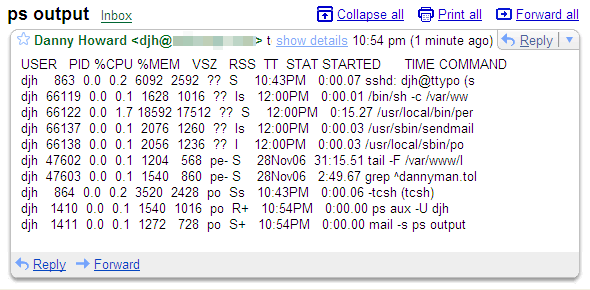
It is pretty lame that after these few years, GMail still has no feature to set your preferred font. But that doesn’t have to stop you! These days (2011) there are a few ways to achieve a fixed-width font in Gmail:
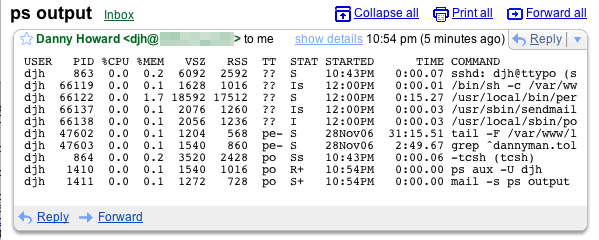
(more…)
5 Comments
Link:
https://dannyman.toldme.com/2006/12/29/jpeg-exif-autorotate/
My last camera had a special sensor in it so it could mark the picture it took with Exif metadata indicating the correct orientation. I set my Flickr account to “auto-rotate” the images and everything was groovy, except Windows and the Macintosh screensaver don’t know for EXIF metadata, so some pictures stay sideways when viewed on my computers.
In my new camera, I have to run through my pictures and manually set the rotation before I offload them to my computer. Again, this because the Windows explorer and picture viewer doohickey, which is otherwise pretty neat, doesn’t grok Exif metadata, so if I use Windows to rotate my photos, I will suffer generational loss on my JPEGs.
Anyway, rotating images within the camera is pretty easy, so I just do that before I offload. For Windows, I Googled and found this awesome little utility, that will go through and rotate your images, losslessly, based on the orientation set in the Exif on the camera. You just right-click on an image, or a directory of images, and it will go through and rotate all your pictures just right once and for all!
Well, until you upload the rotated images to Flickr. If you have enabled auto-rotation in Flickr, and auto-rotate your images the right way beforehand, then Flickr will rotate your images again! At least, this happened to me!
So, I turned off Flickr auto-rotate, and from now on, I’ll set my image orientation in the camera before I transfer to Windows, and on Windows, I’ll right-click and auto-rotate before uploading to Flickr.
Of course, this would all be easier if the Windows explorer supported lossless rotation. At least it warns you that it doesn’t when you try to rotate an image. You would think that if they bothered to warn you they could have just stuck a summer intern on the project. Oh well.
2 Comments
Link:
https://dannyman.toldme.com/2006/12/26/thunderbird-hotkeys/
Just thinking out loud here after some casual Googling left me unsatisfied . . .
I like Thunderbird, mostly, but while it has an extensions interface, I am finding it lacking for basic customization. For example, I like to toss e-mails in an “archive” folder . . . but as far as I can tell I have to drag messages to the folder every time I want to archive them! I dug around and found the “file” button . . . but that thing is just awful! I’d like to . . . press “a” or something, or click an icon, and get the mail archived that way. (Like, to delete a message I press “delete” . . . eh?)
Has anyone found a useful configuration option / extension / doohickey to realize this stuff? Or should I re-acquaint myself with mutt for e-mail triage?
1 Comment
Link:
https://dannyman.toldme.com/2006/12/12/photorescue-recover-digital-images/
Well, I owe a plug, here . . . and a reminder note for myself if this happens again!
My third Canon camera has suffered a death comparable to my second Canon camera. So, I ordered myself a Christmas present today: a Fujifilm FinePix F30 — should be here Wednesday!
Anyway, one thing my second Canon camera did for a very long time was to EAT pictures I had taken. I tried multiple cards but they would just randomly get corrupted in the camera, and Canon went to great lengths to presume that the problem was with me, and not with their camera. (They got sued for doing that–yay class actions!) I am still bugged that I lost pictures of Clapham Junction and of the Eiffel Tower! Grr! Anyway, when I got to Thailand I slowed down enough to find a work-around to the problem of my second Canon: PhotoRescue! (more…)
2 Comments
Link:
https://dannyman.toldme.com/2006/11/29/crontab-l-u-star/
For production systems, I think it is best to use a single, centralized /etc/crontab, which simplifies the job of tracking batch processes. On a production system, batch scripts should be sufficiently robust such that if they are resource or lock-intensive, they make sure everything is okay before they get to work. Stuff like user crons and fcrontab can live in your development and corporate servers.
Of course, sometimes you inherit production systems with people who don’t think like you do. You’ll need to review what random user crons are running on each system. With any luck you’ll have a sane OS that keeps the user crontabs in a well-documented location. (FreeBSD? /var/cron/tabs . . . SuSE . . . still not sure . . .) Of course, luck is a fickle mistress, and sometimes you have to do it the evil way:
> cat /etc/passwd | awk -F : '{print "echo crontabs for user "$1"\ncrontab -l -u "$1"\n"}' > /tmp/crontabs.sh
> head /tmp/crontabs.sh
echo crontabs for user root
crontab -l -u root

echo crontabs for user bin
crontab -l -u bin

echo crontabs for user daemon
crontab -l -u daemon

echo crontabs for user lp
> sudo sh /tmp/crontabs.sh | mail -s "`hostname` crontabs" $USER
If you are borrowing my “recipe” you will likely want to put your e-mail address where it says $USER . . . and, you may have to do the same for fcron as well. Bah!
cat /etc/passwd | awk -F : '{print "echo fcrontabs for user "$1"\n/usr/local/bin/fcrontab -l -u "$1"\n"}' > /tmp/fcrontabs.sh
sudo sh /tmp/fcrontabs.sh | mail -s "`hostname` fcrontabs" $USER
Feedback Welcome
Link:
https://dannyman.toldme.com/2006/10/24/howto-swapon-file/
Scenario: a Linux system with two drives. The system was built with resiliency as a priority, but availability is not critical. So, the filesystems were mounted atop md raid1 for resiliency, and the swap was striped across an md raid0 for performance.
One disk failed and was removed from the system. System returns to service on remaining drive until RMA is completed. Users are informed that the system is available but does not have swap space. Consensus is reached to add some temporary swap space via a swapfile. (more…)
2 Comments
Link:
https://dannyman.toldme.com/2006/10/10/mac-a-la-mode/
I drove down to Mountain View yesterday and met Brian and Jessica for dinner. I also picked up the remote control for the TV Brian gifted us last year. He gave me another remote for the DVD player he also gave me last year, and then there was another TV remote that was nearly identical.
We puzzled a bit, and then I realized that this other TV remote was for a TV I bought years earlier, and had traded to Joe for the TiVo he had won. Joe had lived with Brian prior to my living with Brian, and when he moved he must have forgotten his remote.
Later that night, I was talking to Mike, who has the TiVo that I traded to Joe, which I gave to Mike when I went to travel, since Brian didn’t want it. Mike upgraded the TiVo, and has another connected to the satellite, would I like my old TiVo back, in all its upgraded glory? Not really, though I asked if he might want my car, since I never drive it any more, and could perhaps do without, but due to sentimentality, I would rather “keep it in the family.” (more…)
1 Comment
Link:
https://dannyman.toldme.com/2006/09/13/sleep/
japolo: haha, danny quotes locutus of borg in his code
anna: locutus was cool
dman: hrmmm.
dman: that sounds familiar … care to paste a bit, sir?
japolo: # “Sleep.” –Locutus
japolo: sleep($sleep);
I used to love Star Trek: The Next Generation. But that was pretty damn lame when the Borg got blown up just when they were about to destroy Earth because someone told them to sleep. Now, it just makes me grin.
There are three lights!
5 Comments
« Newer Stuff . . . Older Stuff »
Site Archive