We bought our home in Northern California in 2012, which was great timing because that was about the last time after the mortgage crisis that we could reasonably afford a home, at a mere $605,000. At that time, the home had a floor/wall furnace from 1949 that had a hole that made it a carbon monoxide risk. We upgraded to central heating shortly after. Guys came out and ran ducts all over the attic and hooked them all up to an efficient gas furnace with an air filter. Topped it all off with a shiny Nest thermostat. It gets chilly out here on winter nights, and it used to be only a few days in the summer that anyone needed air conditioning, at which point you go to the office during the week or to the mall on the weekend.
In 2016 I added an air conditioner to the system. The local contractors seemed not quite comfortable with heat pumps, and the furnace was new, and we only run the air conditioner, well, now maybe a total of a few weeks each summer. A major construction project across the street involved asbestos mitigation, and we were having a baby, so the ability to shut the windows on bad days had some appeal. (I later gifted our old box unit AC to another expectant couple who had concerns with construction dust.)
Most of the time, we enjoy having windows open, day and night. Most of the time, our climate is blessedly mild—most of the time. The past few years have had a lot more smoke from all the fires in California. 2020 had an apocalyptic vibe when the plague was joined by a daytime sky turned orange. Shut the windows, run the AC, praise the air filter in the HVAC. For the Pandemic, I also set the air to circulate 15 minutes every hour during off-peak energy hours. (We’re on a Time-of-Use plan.) The idea is that if we had COVID-19 in our air, we would filter some of it out and help improve our odds.
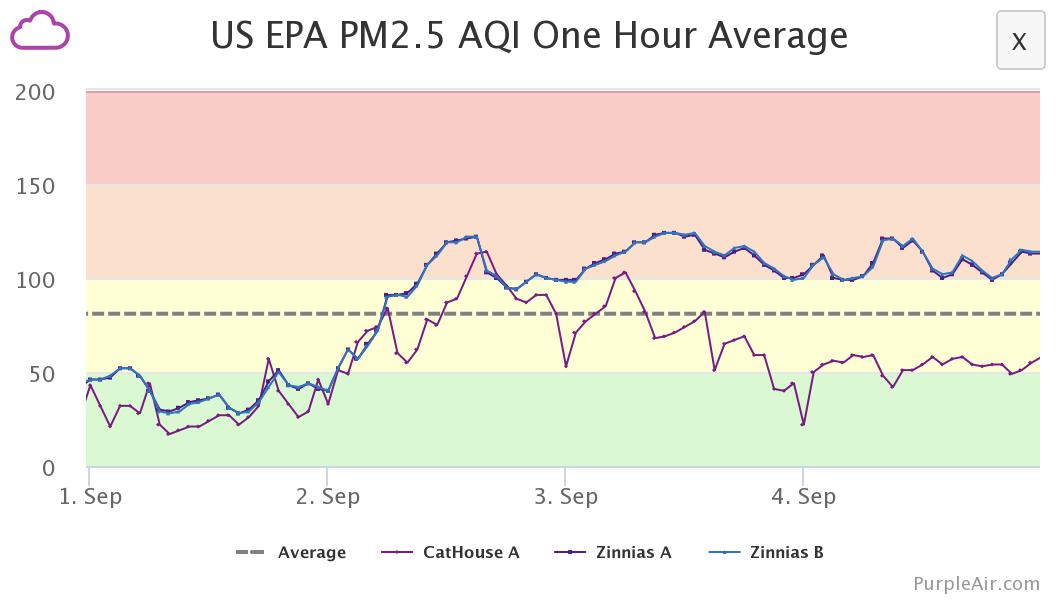
This year has been less awful. The winds have been mostly blowing the fire smoke from the hellscape experienced elsewhere in the West, away from the Bay Area. As a result, AQI has stayed mostly under 200. But as I had gotten back in the habit of checking purpleair.com to figure out if the windows need shut, I got curious to better understand the air quality inside our house, so I ponied up $200 for an indoor monitor. It has a bright LED that changes color based on what it measures, and the boys think that’s a pretty great night light.
My first revelation was that indoor AQI was spiking overnight, starting around midnight. Since I first installed it near the dishwasher, I figured that was the culprit. After a week of A/B testing, I had ruled out the dishwasher and figured out when the wife goes to bed, she likes to run a humidifier, and the water droplets in the air can look like pollution to a laser. Mystery solved!
The other thing I noticed while keeping an eye on purpleair.com to see if it was time to shut the windows is that our indoor AQI would tend to have a lower (better) score than outdoor sensors nearby. That’s good news. Zooming in, I could see a jaggy pattern where the AQI would drop when the furnace fan circulated our air through the MERV 16 filter in the attic, then it would spike back up. The upshot is that we could have open windows most of the time and cleaner air inside the house, but how to run the fan on an efficient schedule?
Well, it is tied to a thermostat … I could implement an “AQI-o-stat” with a Python script that scrapes the AQI reading and tells the Nest to run the fan. The script took about 3 hours to write. 10 minutes to scrape purpleair.com, 2.5 hours to figure out Google/Nest’s authentication API, and 20 minutes to figure out how to set the Nest fan. The authentication part took only 2.5 hours because Wouter Nieworth posted a bunch of helpful screenshots on his blog.
I implemented the “AQI-o-stat” on the afternoon of Sep 3, at which point CatHouse A now keeps AQI around 60 or below, while the neighboring Zinnias outdoor sensor reads in the low hundreds.
There was some tweaking, but I now have a Python script running out of cron that checks the indoor AQI, and if it is above 50, it triggers the timer on the fan. I started polling at 15-minute intervals but found 5-minute intervals made for a steadier outcome. The result is that we can leave the windows open, and the indoor air quality hovers around 60. One less thing to worry about. (There are plenty of things to worry about.) I have been thinking that, in the “New Normal” (which really means there is no “normal” because the climate systems have been thrown into turbulence) that having an air sensor as an input to your smart thermostat will probably just become a standard feature.
I’ve been a SysAdmin for … since the last millennium. Long enough to see certain fads come and go and come again. There was a time when folks got keen on the advantages of chroot jails, but that time faded, then resurged in the form of containers! All the rage!
My own bias is that bare metal systems and VMs are what I am used to: a Unix SysAdmin knows how to manage systems! The advantages and desire for more contained environments seems to better suit certain types of programmers, and I suspect that the desire for chroot-jail-virtualenv-containers may be a reflection of programming trends.
On the one hand, you’ve got say C and Java … write, compile, deploy. You can statically link C code and put your Java all in a big jar, and then to run it on a server you’ll need say a particular kernel version, or a particular version of Java, and some light scaffolding to configure, start/stop and log. You can just write up a little README and hand that stuff off to the Ops team and they’ll figure out the mysterious stuff like chmod and the production database password. (And the load balancer config..eek!)
On the other hand, if you’re hacking away in an interpreted language: say Python or R, you’ve got a growing wad of dependencies, and eventually you’ll get to a point where you need the older version of one dependency and a bleeding-edge version of another and keeping track of those dependencies and convincing the OS to furnish them all for you … what comes in handy is if you can just wad up a giant tarball of all your stuff and run it in a little “isolated” environment. You don’t really want to get Ops involved because they may laugh at you or run in terror … instead you can just shove the whole thing in a container, run that thing in the cloud, and now without even ever having to understand esoteric stuff like chmod you are now DevOps!
(Woah: Job Security!!)
From my perspective, containers start as a way to deploy software. Nowadays there’s a bunch of scaffolding for containers to be a way to deploy and manage a service stack. I haven’t dealt with either case, and my incumbent philosophy tends to be “well, we already have these other tools” …
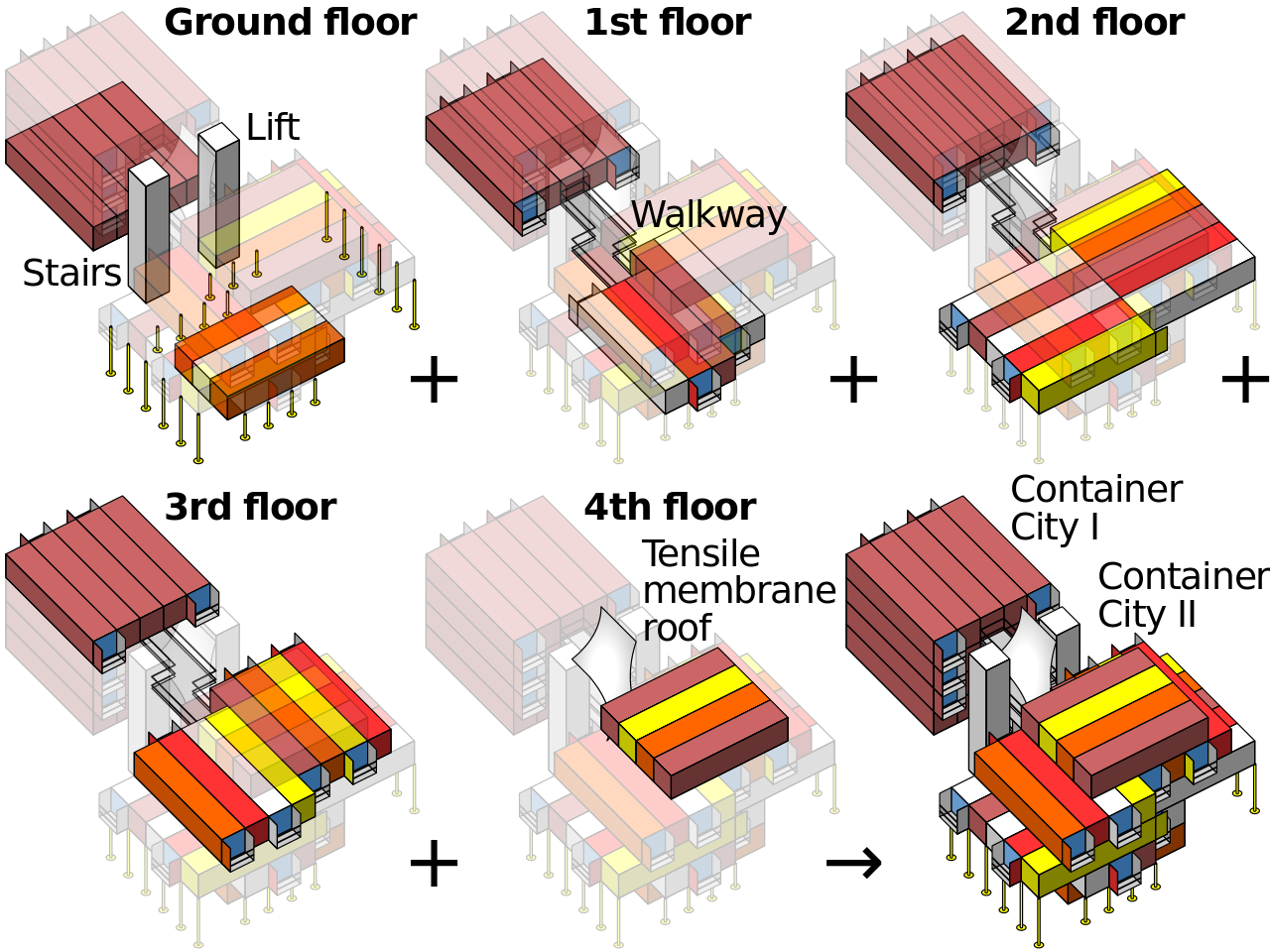
Container Architecture is basically just Legos mixed with Minecraft (CC: Wikipedia)
Anyway, as a Service Provider (… I know “DevOps” is meant to get away from that ugly idea that Ops is a service provider …) I figure if containers help us ship the code, we’ll get us some containers, and if we want orchestration capabilities … well, we have what we have now and we can look at bringing up other new stuff if it will serve us better.
ASIDE: One thing that has put me off containers thus far is not so much that they’re reinventing the wheel, so much that I went to a DevOps conference a few years back and it seemed every single talk was about how we have been delivered from the evil sinful ways of physical computers and VMs and the tyranny of package managers and chmod and load balancers and we have found the Good News that we can build this stuff all over in a new image and it will be called Docker or Mesos or Kubernetes but careful the API changed in the last version but have you heard we have a thing called etcd which is a special thing to manage your config files because nobody has ever figured out an effective way to … honestly I don’t know for etcd one way or another: it was just the glazed, fervent stare in the eyes of the guy who was explaining to me the virtues of etcd …
It turns out it is not just me who is a curmudgeonly contrarian: a lot of people are freaked out by the True Believers. But that needn’t keep us from deploying useful tools, and my colleague reports that Kubernetes for containers seems awfully similar to the Ganeti we are already running for VMs, so let us bootstrap some infrastructure and provide some potentially useful services to the development team, shall we?
As part of a project at work I’ve built some Jython code that builds iCalendar attachments to include meeting invitations for scheduled maintenance sessions. Jython is Python-in-Java which takes some getting used to but is damned handy when you’re working with JIRA. I will share a few anecdotes:
1) For doing date and time calculations, specifically to determine locale offset from UTC, you’re a lot happier calling the Java SimpleDateFormat stuff than you are dealing with Python. Python is a beautiful language but I burned a lot of time in an earlier version of this code figuring out how to convert between different time objects for manipulation and whatnot. This is not what you would expect from an intuitive, weakly-typed language, and it is interesting to find that the more obtuse, strongly-typed language handles time zones and it just fricking works.
Here is some sample code:
from java.text import SimpleDateFormat
from com.atlassian.jira.timezone import TimeZoneManagerImpl
tzm = TimeZoneManagerImpl(ComponentManager.getInstance().getJiraAuthenticationContext(),
    ComponentManager.getInstance().getUserPreferencesManager(),
    ComponentManager.getInstance().getApplicationProperties())
# df_utc = DateFormat UTC
# df_assignee = DateFormat Assignee
df_utc = SimpleDateFormat("EEE yyyy-MM-dd HH:mm ZZZZZ (zzz)")
df_assignee = SimpleDateFormat("EEE yyyy-MM-dd HH:mm ZZZZZ (zzz)")
tz = df_utc.getTimeZone()
df_utc.setTimeZone(tz.getTimeZone("UTC"))
df_assignee.setTimeZone(tzm.getTimeZoneforUser(assignee))
issue_dict['Start_Time_text'] = df_utc.format(start_time.getTime())
issue_dict['Start_Time_html'] = df_utc.format(start_time.getTime())
if df_utc != df_assignee:
    issue_dict['Start_Time_text'] += "\r\n                   "
    issue_dict['Start_Time_text'] += df_assignee.format(start_time.getTime())
    issue_dict['Start_Time_html'] += "
"
    issue_dict['Start_Time_html'] += df_assignee.format(start_time.getTime())
# Get TimeZone of Assignee
# Start Time in Assignee TimeZone
Since our team is global I set up our announcement emails to render the time in UTC, and, if it is different, in the time zone of the person leading the change. For example:
We have a team in London. I have not yet tested it but as I understand it, once they leave BST, their timezone is UTC. I am looking forward to seeing if this understanding is correct.
As I understand it, I’m pulling the current time zone of the user, which changes when we enter and leave DST, which means that the local time will be dodgy when we send an announcement before the cutover for a time after the cut-over.
2) I was sending meeting invitations with the host set to the assignee of the maintenance event. This seemed reasonable to me, but when Mac Outlook saw that the host was set, it would not offer to add the event to the host’s calendar. After all, all meeting invitations come from Microsoft Outlook, right?! If I am the host it must already be on my calendar!!
I tried just not setting the host. This worked fine except now people would RSVP to the event and they would get an error stuck in their outboxes.
So . . . set the host to a bogus email address? My boss was like “just change the code to send two different invitations” which sounds easy enough for him but I know how creaky and fun to debug is my code. I came upon a better solution: I set the host address to user+calendar@domain.com. This way, Outlook is naive enough to believe the email address doesn’t match, but all our software which handles mail delivery knows the old ways of address extension . . . I can send one invitation, and have that much less messy code to maintain.
from icalendar import Calendar, Event, UTC, vText, vCalAddress
# [ . . . ]
event = Event()
# [ . . . ]
# THIS trick allows organizer to add event without breaking RSVP
# decline functionality.  (Outlook and its users suck.)
organizer_a = assignee.getEmailAddress().split('@')
organizer = vCalAddress('MAILTO:' + organizer_a[0]+ '+calendar@' +
    organizer_a[1])
organizer.params['CN'] = vText(assignee.getDisplayName() + ' (' + assignee.getName() + ')')
event['organizer'] = organizer
You can get an idea of what fun it is to build iCalendar invitations, yes? The thing with the parentheses concatenation on the CN line is to follow our organization’s convention of rendering email addresses as “user@organization.com (Full Name)”.
3) Okay, third anecdote. You see in my first code fragment that I’m building up text objects for HTML and plaintext. I feed them into templates and craft a beautiful mime multipart/alternative with HTML and nicely-formatted plaintext . . . however, if there’s a Calendar invite also attached then Microsoft Exchange blows all that away, mangles the HTML to RTF and back again to HTML, and then renders its own text version of the RTF. My effort to make a pretty text email for the users gets chewed up and spat out, and my HTML gets mangled up, too. (And, yes, I work with SysAdmins so some users actually do look at the plain text . . .) I hate you, Microsoft Exchange!
Somewhat elaborate: enforce that time worked has been logged, except under certain circumstances. See original post.
import com.atlassian.jira.issue.worklog.Worklog
from com.atlassian.jira import ComponentManager

# Time Already Logged
timespent = issue.getTimeSpent()
# Time Logged via current screen
try:
    timelogged = dict(issue.getModifiedFields())['worklog']
except:
    timelogged = False

# Duplicate Issue?  It is as good as logged!
resolution = issue.getResolution()
if resolution['name'] == "Duplicate":
    timelogged = True
if resolution['name'] == "Self Corrected":
    timelogged = True

# Nagios likes to close tickets, but doesn't get paid
user = ComponentManager.getInstance().getJiraAuthenticationContext().getUser()
if user.getName() == "nagios":
    timelogged = True

if timespent < = 0 and timelogged == False:
    result = False
    description = "Please log the time you spent on this ticket."
Assign Unassigned Issue to User
This helps make sure tickets get assigned.
# -*- coding: UTF-8 -*-
from com.atlassian.jira import ComponentManager

assignee = issue.getAssignee()
user = ComponentManager.getInstance().getJiraAuthenticationContext().getUser()

if not issue.getAssignee():
    issue.setAssignee(ComponentManager.getInstance().getJiraAuthenticationContext().getUser())
Validate Custom Field Value
We have a particular custom field which can be set UNKNOWN by the Reporter, but which should be cleaned up by the Assignee.
from com.atlassian.jira import ComponentManager

cfm = ComponentManager.getInstance().getCustomFieldManager()
product = issue.getCustomFieldValue(cfm.getCustomFieldObject('customfield_12345'))

if product == 'UNKNOWN':
    result = False
    description = "Please set CUSTOM_FIELD value appropriately."
Yesterday I got Dr Sick Wife to drop me off at the Santa Clara Convention Center so Mr Sicker Light-Headed Husband wouldn’t miss any PYCON. After an awkward twenty minutes of asking people there for the lighting and LED conference where the Python was, I checked my smart phone and noted that … PYCON is *MARCH* 7th.
So I took the light rail home and told $BOSS I was on PTO (well, I call it MLK day due to Puppet Training) I then slept a lot, and did other things sick people do that don’t bear repeating in a professional context, and watched Dr Who save the Earth on TV, slept some more, and I am feeling way better today, which means I feel regular sick, not super sick.
So, I’ll be WFH today. Trust me, whatever this is, you’re lucky to miss out! I don’t normally get sick so this is a novel experience … I’ll likely be seen in the office next week, though if I’m coughy or sneezy I’ll keep that train wreck at home, because, as you might gather, you don’t want a piece of this!
If you’re attending PyCon, I look forward to seeing you there … next month! Hopefully I won’t be light-headed!
Well, I am working on extending a Django application to add log entries to the django.contrib.admin.models.LogEntry which may be fodder for another post, but while composing a change_message I wanted to convert a list of “changes” into a string like “Changed this thing, that thing, and that other thing.”
Here is what I have got, and since it is Python I bet $1 that someone will comment with a better way. (I couldn’t figure a good search query for seeking the answer so I had to use my brain.)
if len(updated_list) > 1:
    rs = "Changed " + ", ".join(map(str, updated_list[:-1])) + " and " + updated_list[-1] + "."
else:
    rs = "Changed " + updated_list[0] + "."

>>> updated_list = ['just one thing']
>>> print "Changed " + updated_list[0] + "."
Changed just one thing.
>>> updated_list = ['one thing', 'another thing']
>>> print "Changed " + ", ".join(map(str, updated_list[:-1])) + " and " + updated_list[-1] + "."
Changed one thing and another thing.
>>> updated_list = ['this thing', 'that thing', 'that other thing']
>>> print "Changed " + ", ".join(map(str, updated_list[:-1])) + " and " + updated_list[-1] + "."
Changed this thing, that thing and that other thing.
Perl’s “natural language” emphasis and non-obvious locutions encourage developers to document their code. Many times I have put some hard work into a line or a block of code, and ended up writing in some comments as a part of the process.
Python code is nice and readable but often very poorly documented. “The code should speak for itself,” and while it is easier to read Python code sometimes a few human-language comments would save some time and annoyance.
Maintaining Python code is easier than maintaining Perl, but using Perl modules is often easier than using Python modules because Perl developers are kinda forced to explain their work.
One of the first things I had to accept about pydoc is it is almost universally worthless, and even good functional documentation will often omit the sort of useful examples that I am most likely to find quickly intuitive.
This is why I have transitioned so slowly. Python’s strengths breed a certain weakness just as Perl’s weaknesses breed a certain strength.
At this point, I would consider myself approaching bi-linguality, and pretty comfortable in either language. If I have a preference it would be for Python, because I am lazy about documentation and even maintaining my own code, it is a lot easier to figure out what I wrote in Python somewhat after the fact. But my fondness for Perl and its generally more approachable documentation stands, and I’m not about to dis what has served me so long and so well.
Now, here’s the cute things I ran into. I had originally built a model with a TextField primary key. This is fine by SQLite but when Django tries to create a BLOB field you get in trouble asking for it to be unique, never mind a primary key. Fortunately, it was easy enough for me to simply change it to a CharField, which will tell Django to use VARCHAR. (SQLite certainly didn’t mind.)
The other was that neither Django nor SQLite were enforcing field length limitations, so I would hit some errors when loaddata tried to bring in database entries that were too long. I worked around this by raising my length limitations. There was also some ugliness with a UTF-8 string, which I solved by creating the text object in question.
To make up for my snarkiness in my last post . . . it is an easy matter of fetching the WebRss node from Twiki and running it through the Universal Feed Parser:
# Twiki RSS Feed
twiki_rss_url='http://localhost/twiki/bin/view/Main/WebRss'

import feedparser
import time
import calendar

# http://www.feedparser.org/
d = feedparser.parse(twiki_rss_url)

for e in d['entries']:
    # e.updated_parsed = tuple UTC
    # calendar.timegm = seconds UTC
    # time.localtime = tuple locale
    print time.strftime("%Y-%m-%d %H:%M",
            time.localtime(calendar.timegm(e.updated_parsed)))
    print e.rdf_value # Author
    print e.title
    print