Link:
https://dannyman.toldme.com/2023/03/23/de-duplicating-files-with-jdupes/
Part of my day job involves looking at Nagios and checking up on systems that are filling their disks. I was looking at a system with a lot of large files, which are often duplicated, and I thought this would be less of an issue with de-duplication. There are filesystems that support de-duplication, but I recalled the fdupes command, a tool that “finds duplicate files” … if it can find duplicate files, could it perhaps hard-link the duplicates? The short answer is no.
But there is a fork of fdupes called jdupes, which supports de-duplication! I had to try it out.
It turns out your average Hadoop release ships with a healthy number of duplicate files, so I use that as a test corpus.
> du -hs hadoop-3.3.4

1.4G hadoop-3.3.4

> du -s hadoop-3.3.4

1413144 hadoop-3.3.4

> find hadoop-3.3.4 -type f | wc -l

22565
22,565 files in 1.4G, okay. What does jdupes think?
> jdupes -r hadoop-3.3.4 | head

Scanning: 22561 files, 2616 items (in 1 specified)

hadoop-3.3.4/NOTICE.txt

hadoop-3.3.4/share/hadoop/yarn/webapps/ui2/WEB-INF/classes/META-INF/NOTICE.txt
hadoop-3.3.4/libexec/hdfs-config.cmd
hadoop-3.3.4/libexec/mapred-config.cmd
hadoop-3.3.4/LICENSE.txt
hadoop-3.3.4/share/hadoop/yarn/webapps/ui2/WEB-INF/classes/META-INF/LICENSE.txt
hadoop-3.3.4/share/hadoop/common/lib/commons-net-3.6.jar
There are some duplicate files. Let’s take a look.
> diff hadoop-3.3.4/libexec/hdfs-config.cmd hadoop-3.3.4/libexec/mapred-config.cmd

> ls -l hadoop-3.3.4/libexec/hdfs-config.cmd hadoop-3.3.4/libexec/mapred-config.cmd

-rwxr-xr-x 1 djh djh 1640 Jul 29 2022 hadoop-3.3.4/libexec/hdfs-config.cmd

-rwxr-xr-x 1 djh djh 1640 Jul 29 2022 hadoop-3.3.4/libexec/mapred-config.cmd
Look identical to me, yes.
> jdupes -r -m hadoop-3.3.4

Scanning: 22561 files, 2616 items (in 1 specified)

2859 duplicate files (in 167 sets), occupying 52 MB
Here, jdupes says it can consolidate the duplicate files and save 52 MB. That is not huge, but I am just testing.
> jdupes -r -L hadoop-3.3.4|head

Scanning: 22561 files, 2616 items (in 1 specified)

[SRC] hadoop-3.3.4/NOTICE.txt

----> hadoop-3.3.4/share/hadoop/yarn/webapps/ui2/WEB-INF/classes/META-INF/NOTICE.txt
[SRC] hadoop-3.3.4/libexec/hdfs-config.cmd
----> hadoop-3.3.4/libexec/mapred-config.cmd
[SRC] hadoop-3.3.4/LICENSE.txt
----> hadoop-3.3.4/share/hadoop/yarn/webapps/ui2/WEB-INF/classes/META-INF/LICENSE.txt
[SRC] hadoop-3.3.4/share/hadoop/common/lib/commons-net-3.6.jar
How about them duplicate files?
> diff hadoop-3.3.4/libexec/hdfs-config.cmd hadoop-3.3.4/libexec/mapred-config.cmd

> ls -l hadoop-3.3.4/libexec/hdfs-config.cmd hadoop-3.3.4/libexec/mapred-config.cmd

-rwxr-xr-x 2 djh djh 1640 Jul 29 2022 hadoop-3.3.4/libexec/hdfs-config.cmd

-rwxr-xr-x 2 djh djh 1640 Jul 29 2022 hadoop-3.3.4/libexec/mapred-config.cmd
In the ls output, the “2” in the second column indicates the number of hard links to a file. Before we ran jdupes, each file only linked to itself. After, these two files link to the same spot on disk.
> du -s hadoop-3.3.4

1388980 hadoop-3.3.4

> find hadoop-3.3.4 -type f | wc -l

22566
The directory uses slightly less space, but the file count is the same!
But, be careful!
If you have a filesystem that de-duplicates data, that’s great. If you change the contents of a de-duplicated file, the filesystem will store the new data for the changed file and the old data for the unchanged file. If you de-duplicate with hard links and you edit a deduplicated file, you edit all the files that link to that location on disk. For example:
> ls -l hadoop-3.3.4/libexec/hdfs-config.cmd hadoop-3.3.4/libexec/mapred-config.cmd

-rwxr-xr-x 2 djh djh 1640 Jul 29 2022 hadoop-3.3.4/libexec/hdfs-config.cmd

-rwxr-xr-x 2 djh djh 1640 Jul 29 2022 hadoop-3.3.4/libexec/mapred-config.cmd

> echo foo >> hadoop-3.3.4/libexec/hdfs-config.cmd

> ls -l hadoop-3.3.4/libexec/hdfs-config.cmd hadoop-3.3.4/libexec/mapred-config.cmd

-rwxr-xr-x 2 djh djh 1644 Mar 23 16:16 hadoop-3.3.4/libexec/hdfs-config.cmd

-rwxr-xr-x 2 djh djh 1644 Mar 23 16:16 hadoop-3.3.4/libexec/mapred-config.cmd
Both files are now 4 bytes longer! Maybe this is desired, but in plenty of cases, this could be a problem.
Of course, the nature of how you “edit” a file is very important. A file copy utility might replace the files, or it may re-write them in place. You need to experiment and check your documentation. Here is an experiment.
> ls -l hadoop-3.3.4/libexec/hdfs-config.cmd hadoop-3.3.4/libexec/mapred-config.cmd

-rwxr-xr-x 2 djh djh 1640 Mar 23 16:19 hadoop-3.3.4/libexec/hdfs-config.cmd

-rwxr-xr-x 2 djh djh 1640 Mar 23 16:19 hadoop-3.3.4/libexec/mapred-config.cmd

> cp hadoop-3.3.4/libexec/hdfs-config.cmd hadoop-3.3.4/libexec/mapred-config.cmd

cp: 'hadoop-3.3.4/libexec/hdfs-config.cmd' and 'hadoop-3.3.4/libexec/mapred-config.cmd' are the same file
The cp command is not having it. What if we replace one of the files?
> cp hadoop-3.3.4/libexec/mapred-config.cmd hadoop-3.3.4/libexec/mapred-config.cmd.orig

> echo foo >> hadoop-3.3.4/libexec/hdfs-config.cmd

> ls -l hadoop-3.3.4/libexec/hdfs-config.cmd hadoop-3.3.4/libexec/mapred-config.cmd

-rwxr-xr-x 2 djh djh 1644 Mar 23 16:19 hadoop-3.3.4/libexec/hdfs-config.cmd

-rwxr-xr-x 2 djh djh 1644 Mar 23 16:19 hadoop-3.3.4/libexec/mapred-config.cmd

> cp hadoop-3.3.4/libexec/mapred-config.cmd.orig hadoop-3.3.4/libexec/mapred-config.cmd

> ls -l hadoop-3.3.4/libexec/hdfs-config.cmd hadoop-3.3.4/libexec/mapred-config.cmd

-rwxr-xr-x 2 djh djh 1640 Mar 23 16:19 hadoop-3.3.4/libexec/hdfs-config.cmd

-rwxr-xr-x 2 djh djh 1640 Mar 23 16:19 hadoop-3.3.4/libexec/mapred-config.cmd
When I run the cp command to replace one file, it replaces both files.
Back at work, I found I could save a lot of disk space on the system in question with jdupes -L, but I am also wary of unintended consequences of linking files together. If we pursue this strategy in the future, it will be with considerable caution.
Feedback Welcome
Link:
https://dannyman.toldme.com/2018/06/06/why-hard-drives-get-slower-as-you-fill-them-up/
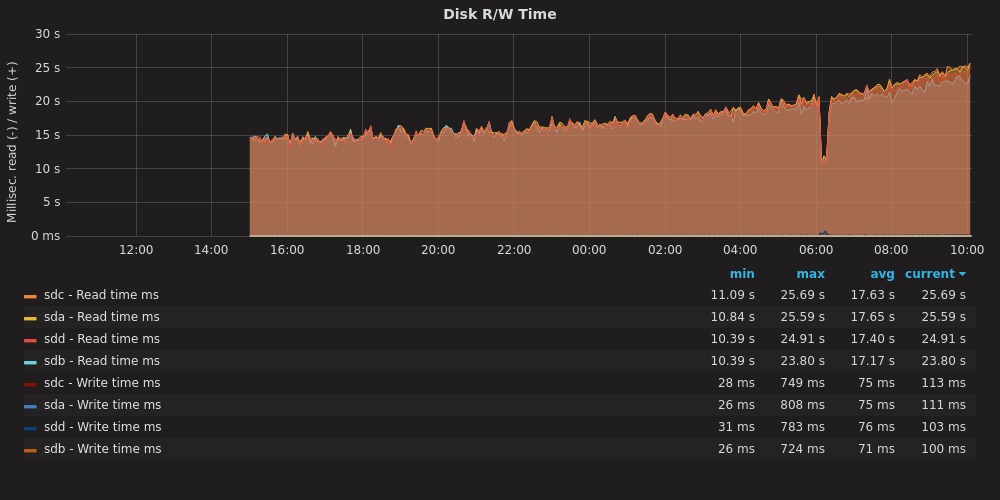
I built a new system (from old parts) yesterday. It is a RAID10 with 4x 8TB disks. While the system is up and running, it takes forever for mdadm to complete “building” the RAID. All the same, I got a little smile from this graph:
As the RAID assembles, the R/W operations take longer to complete.
The process should be about 20 hours total. As we get move through the job, the read-write operations take longer. Why? I have noticed this before. What happens here is that the disk rotates at a constant speed, but towards the rim you can fit a lot more data than towards the center. The speed with which you access data depends on whether you are talking to the core or to the rim of the magnetic platter.
What the computer does is it uses the fastest part of the disk first, and as the disk gets filled up, it uses the slower parts. With an operation like this that covers the entire disk, you start fast and get slower.
This is part of the reason that your hard drive slows down as it gets filled up: when your disk was new, the computer was using the fast-spinning outer rim. As that fills up, it has to read and write closer to the core. That takes longer. Another factor is that the data might be more segmented, packed into nooks and crannies where space is free, and your Operating System needs to seek those pieces out and assemble them. On a PC, the bigger culprit is probably that you have accumulated a bunch of extra running software that demands system resources.
Feedback Welcome
Link:
https://dannyman.toldme.com/2016/08/24/vms-vs-containers/
I’ve been a SysAdmin for … since the last millennium. Long enough to see certain fads come and go and come again. There was a time when folks got keen on the advantages of chroot jails, but that time faded, then resurged in the form of containers! All the rage!
My own bias is that bare metal systems and VMs are what I am used to: a Unix SysAdmin knows how to manage systems! The advantages and desire for more contained environments seems to better suit certain types of programmers, and I suspect that the desire for chroot-jail-virtualenv-containers may be a reflection of programming trends.
On the one hand, you’ve got say C and Java … write, compile, deploy. You can statically link C code and put your Java all in a big jar, and then to run it on a server you’ll need say a particular kernel version, or a particular version of Java, and some light scaffolding to configure, start/stop and log. You can just write up a little README and hand that stuff off to the Ops team and they’ll figure out the mysterious stuff like chmod and the production database password. (And the load balancer config..eek!)
On the other hand, if you’re hacking away in an interpreted language: say Python or R, you’ve got a growing wad of dependencies, and eventually you’ll get to a point where you need the older version of one dependency and a bleeding-edge version of another and keeping track of those dependencies and convincing the OS to furnish them all for you … what comes in handy is if you can just wad up a giant tarball of all your stuff and run it in a little “isolated” environment. You don’t really want to get Ops involved because they may laugh at you or run in terror … instead you can just shove the whole thing in a container, run that thing in the cloud, and now without even ever having to understand esoteric stuff like chmod you are now DevOps!
(Woah: Job Security!!)
From my perspective, containers start as a way to deploy software. Nowadays there’s a bunch of scaffolding for containers to be a way to deploy and manage a service stack. I haven’t dealt with either case, and my incumbent philosophy tends to be “well, we already have these other tools” …
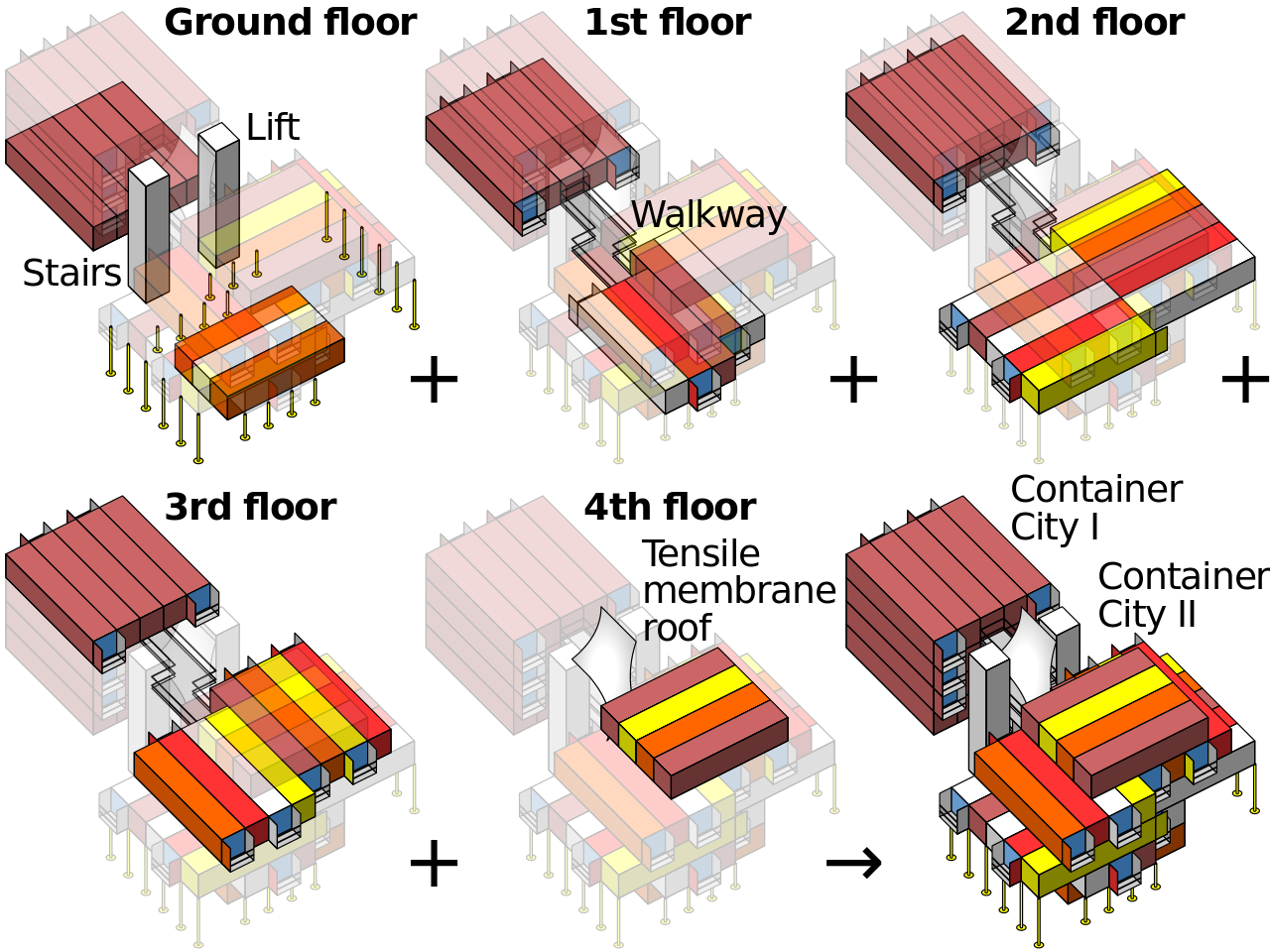
Container Architecture is basically just Legos mixed with Minecraft (CC: Wikipedia)
Anyway, as a Service Provider (… I know “DevOps” is meant to get away from that ugly idea that Ops is a service provider …) I figure if containers help us ship the code, we’ll get us some containers, and if we want orchestration capabilities … well, we have what we have now and we can look at bringing up other new stuff if it will serve us better.
ASIDE: One thing that has put me off containers thus far is not so much that they’re reinventing the wheel, so much that I went to a DevOps conference a few years back and it seemed every single talk was about how we have been delivered from the evil sinful ways of physical computers and VMs and the tyranny of package managers and chmod and load balancers and we have found the Good News that we can build this stuff all over in a new image and it will be called Docker or Mesos or Kubernetes but careful the API changed in the last version but have you heard we have a thing called etcd which is a special thing to manage your config files because nobody has ever figured out an effective way to … honestly I don’t know for etcd one way or another: it was just the glazed, fervent stare in the eyes of the guy who was explaining to me the virtues of etcd …
It turns out it is not just me who is a curmudgeonly contrarian: a lot of people are freaked out by the True Believers. But that needn’t keep us from deploying useful tools, and my colleague reports that Kubernetes for containers seems awfully similar to the Ganeti we are already running for VMs, so let us bootstrap some infrastructure and provide some potentially useful services to the development team, shall we?
Feedback Welcome
Link:
https://dannyman.toldme.com/2015/11/11/variability-of-hard-drive-speed/
Munin gives me this beautiful graph:
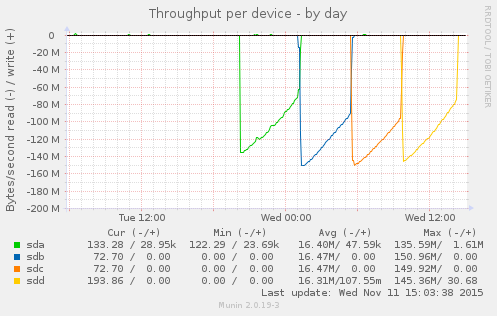
This is the result of:
$ for s in a b c d; do echo ; echo sd${s} ; sudo dd if=/dev/sd${s} of=/dev/null; done

sda
3907029168+0 records in
3907029168+0 records out
2000398934016 bytes (2.0 TB) copied, 17940.3 s, 112 MB/s

sdb
3907029168+0 records in
3907029168+0 records out
2000398934016 bytes (2.0 TB) copied, 15457.9 s, 129 MB/s

sdc
3907029168+0 records in
3907029168+0 records out
2000398934016 bytes (2.0 TB) copied, 15119.4 s, 132 MB/s

sdd
3907029168+0 records in
3907029168+0 records out
2000398934016 bytes (2.0 TB) copied, 16689.7 s, 120 MB/s
The back story is that I had a system with two bad disks, which seems a little weird. I replaced the disks and I am trying to kick some tires before I put the system back into service. The loop above says “read each disk in turn in its entirety.” Prior to replacing the disks, a loop like the above would cause the bad disks, sdb, and sdc, to abort read before completing the process.
The disks in this system are 2TB 7200RPM SATA drives. sda and sdd are Western Digital, while sdb and sdc are HGST. This is in no way intended as a benchmark, but what I appreciate is the consistent pattern across the disks: throughput starts high and then gradually drops over time. What is going on? Well, these are platters of magnetic discs spinning at a constant speed. When you read a track on the outer part of the platter, you get more data than when you read from closer to the center.
I appreciate the clean visual illustration of this principle. On the compute cluster, I have noticed that we are more likely to hit performance issues when storage capacity gets tight. I had some old knowledge from FreeBSD that at a certain threshold, the OS optimizes disk writes for storage versus speed. I don’t know if Linux / ext4 operates that way. It is reassuring to understand that, due to the physical properties, traditional hard drives slow down as they fill up.
Feedback Welcome
Link:
https://dannyman.toldme.com/2012/05/10/mysql-not-configured-for-utf8/
I have had bad luck trying to coax this out of Google, so here’s a Perl one-liner:
perl -pi -e 's/[\x80-\xEF]//g' file.txt
Where file.txt is a file you want to clean up.
Why this comes up is because we have a web application that was set up to hit a MySQL database, which is incorrectly configured to store text as ASCII instead of UTF-8. The application assumes that all text is Unicode and that the database is correctly configured, and every week or two someone asks me why they are getting this weird gnarly error. Typically they are pasting in some weird UTF-8 whitespace character sent to us from Ukraine.
Eventually the database will be reloaded as UTF-8 and the problem will be solved. Until then, I can tell folks to use the Perl command above. It just looks for anything with the high bit set and strips it out.
Feedback Welcome
Link:
https://dannyman.toldme.com/2010/09/20/lockf-flock-cron/
Old SysAdmin tip: keep your frequent-but-long-running cron jobs from running concurrently by adding some lightweight file locking to your cron entry. For example, if you have:
* 15 * * * /usr/local/bin/db-backup.sh
On FreeBSD you could use:
* 15 * * * /usr/bin/lockf -t 0 /tmp/db-backup.lock /usr/local/bin/db-backup.sh
Or on Linux:
* 15 * * * /usr/bin/flock -w 0 /tmp/db-backup.lock /usr/local/bin/db-backup.sh
Read up on the lockf or flock man pages before you go putting this in. This can be a bit tricky because these can also be system calls. Try “man 1 lockf” or the like to nail it down to the manual for the user-executable command.
1 Comment
Link:
https://dannyman.toldme.com/2010/06/05/fix-your-dns-with-google/
I have run in to this a zillion times. You SSH to a Unix server, type your password, and then wait a minute or two before you get the initial shell prompt, after which everything is reasonably zippy.
The short answer is “probably, something is wrong with DNS . . . your server is trying to look up your client but it can not, so it sits there for a couple of minutes until it times out, and then it lets you in.”
Yesterday I was working with an artist who had a hosting account, and when he got in, I said:
sudo vim /etc/resolv.conf
He admitted that he had just copied the DNS configuration from his previous server. How to fix this? Well, he could check what nameservers are provided by his current hosting company . . . . or, I changed his file to read:
nameserver 8.8.8.8
“What’s that, localhost?”
“It’s Google! Wherever you are, they’ll give you DNS.”
“Cool!!”
“Yes!!”
Feedback Welcome
Link:
https://dannyman.toldme.com/2008/07/04/shell-sh-bash-random-splay/
The other day I was working on a shell script to be run on several hundred machines at the same time. Since the script was going to download a file from a central server, and I did not want to overwhelm the central server with hundreds of simultaneous requests, I decided that I wanted to add a random wait time. But how do you conjure a random number within a specific range in a shell script?
Updated: Due to much feedback, I now know of three ways to do this . . .
1) On BSD systems, you can use jot(1):
sleep `jot -r 1 1 900`
2) If you are scripting with bash, you can use $RANDOM:
sleep `echo $RANDOM%900 | bc`
3) For portability, you can resort to my first solution:
# Sleep up to fifteen minutes

sleep `echo $$%900 | bc`
$$ is the process ID (PID), or “random seed” which on most systems is a value between 1 and 65,535. Fifteen minutes is 900 seconds. % is modulo, which is like division but it gives you the remainder. Thus, $$ % 900 will give you a result between 0 and 899. With bash, $RANDOM provides the same utility, except it is a different value whenever you reference it.
Updated yet again . . . says a friend:
nah it’s using `echo .. | bc` that bugs me, 2 fork+execs, let your shell do the math, it knows how
so $(( $$ % 900 )) should work in bsd sh
For efficiency, you could rewrite the latter two solutions:
2.1) sleep $(( $RANDOM % 900 ))
3.1) sleep $(( $$ % 900 ))
The revised solution will work in sh-derived shells: sh, bash, ksh. My original “portable” solution will also work if you’re scripting in csh or tcsh.
2 Comments
Link:
https://dannyman.toldme.com/2008/05/06/what-time-utc/
I wanted to know what time it was in UTC, but I forgot my local offset. (It changes twice a year!) I figured I could look in the date man page, but I came up with an “easier” solution. Simply fudge the time zone and then ask.
0-20:57 djh@noneedto ~$ env TZ=UTC date
Tue May  6 03:57:07 UTC 2008
The env bit is not needed in bash, but it makes tcsh happy.
Update: Mark points out an easier solution:
date -u
Knowing you can set TZ= is still useful in case you ever need to contemplate an alternate timezone.
(Thanks, Saul and Dave for improving my knowledge.)
3 Comments
Link:
https://dannyman.toldme.com/2008/01/26/deader-than-amiga/
I have been playing with Google Trends, which will be happy to generate a pretty graph of keyword frequency over time. A rough gauge to the relative popularity of various things. This evening, I was riffing off a post from the Royal Pingdom, regarding the relative popularity of Ubuntu and Vista, among other things.
I got started graphing various Linux distributions against each other, XP versus Vista, and trying to figure out the best keyword for OS X. Then, I wondered about FreeBSD. Against Ubuntu, it was a flatline. So, I asked myself: what is the threshold for a dead or dying Operating System?
Amiga vs FreeBSD:
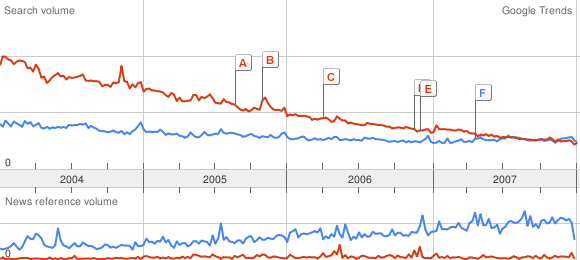
Ouch! Can we get deader?
Amiga vs FreeBSD vs BeOS:
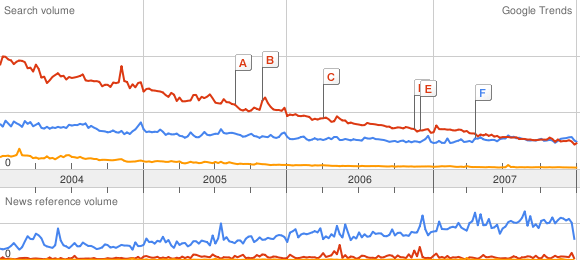
To be fair, the cult of Amiga is still strong . . . BeOS is well and truly dead. But how do the BSDs fare?
Amiga vs FreeBSD vs BeOS vs NetBSD vs OpenBSD:
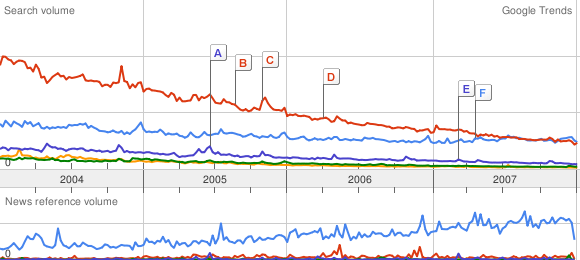
NetBSD has been sleeping with the BeOS fishes for a while, and OpenBSD is on its way. And that’s a league below Amiga!
In Red Hat land, only Fedora beats “the Amiga Line”. For Unix in general, nothing stops the Ubuntu juggernaut. But there’s a long way to go to catch up with Uncle Bill.
(Yes, it is a rainy night and the girlfriend is out of town.)
Postscript: Ubuntu versus Obama
3 Comments
Link:
https://dannyman.toldme.com/2008/01/11/etc-crontab-or-die/
This is just a note which I contributed to a thread on sage-members, to get something off my chest, as to where people should maintain their crontab entries. I sincerely doubt that reading what I have to say will bring you any great illumination.
I’d say, any reasonable SysAdmin should default to /etc/crontab because every other reasonable SysAdmin already knows where it is. If anything is used in addition to /etc/crontab, leave a note in /etc/crontab advising the new guy who just got paged at 3:45am where else to look for crons.
For production systems, I strongly object to the use of per-user crontabs. I’m glad to hear I’m not alone. One thing I have to do in a new environment tends to be to write a script that will sniff out all the cron entries.
And then there was the shop that used /etc/crontab, user crons, and fcron to keep crons from running over each other. This frustrated me enough that I did a poor job of explaining that job concurrency could easily be ensured by executing a command through (something like) the lockf utility, instead of adding a new layer of system complexity.
Yes, I am a cranky old SysAdmin.
2 Comments
Link:
https://dannyman.toldme.com/2007/03/30/howto-verify-pgp-signature/
So, assuming you are a SysAdmin, you really want to get a basic understanding of public key cryptography and the rest. But then, there’s a lot of stuff you need to learn and sometimes you just need to apply a patch, and would like some decent assurance that the patch hasn’t been compromised.
Today, I am patching–a few weeks too late–a FreeBSD system to reflect recent legislative changes to Daylight Saving Time. The procedure is very simple, and covered in FreeBSD Security Advisory FreeBSD-EN-07:04.zoneinfo. It starts:
a) Download the relevant patch from the location below, and verify the detached PGP signature using your PGP utility.
# fetch http://security.FreeBSD.org/patches/EN-07:04/zoneinfo.patch

# fetch http://security.FreeBSD.org/patches/EN-07:04/zoneinfo.patch.asc
Alas, here is a quick-and-dirty crib sheet for the “verify the detached PGP signature using your PGP utility” part: (more…)
1 Comment
Link:
https://dannyman.toldme.com/2006/03/31/freebsd-howto-fix-indiana-dst/
Nominally, you would fix a FreeBSD server by supping to stable, and running:
cd /usr/src/share/zoneinfo && make clean && make install
Though, you may have a valid reason for not doing all that. You could instead do this:
~> ls /usr/share/zoneinfo/America/Indiana
Indianapolis    Knox            Marengo         Vevay
~> fetch ftp://elsie.nci.nih.gov/pub/tzdata2006b.tar.gz
Receiving tzdata2006b.tar.gz (149555 bytes): 100%
149555 bytes transferred in 2.6 seconds (55.68 kBps)
~> tar xfz tzdata2006b.tar.gz
~> sudo zic northamerica
~> ls /usr/share/zoneinfo/America/Indiana
Indianapolis    Marengo         Vevay
Knox            Petersburg      Vincennes
A tip-of-the-hat to William Computer Blog and participants on the FreeBSD-questions mailing list.
Feedback Welcome
Link:
https://dannyman.toldme.com/2005/12/07/pkgwhich-rpm-qf/
Aye. So, let us say you want to know what package a file comes from.
On FreeBSD:
0-17:16 djh@web3 ~> find /var/db/pkg -name +CONTENTS | xargs grep -l pdftex

/var/db/pkg/teTeX-1.0.7_1/+CONTENTS
Ugly, eh? Which, I think the portinstall stuff has a pkgwhich command.
Update: On FreeBSD, one may use:
pkg_info -W `which pdftex`
Linux?
[root@novadb0 pdftex-1.30.5]# rpm -qf /usr/bin/pdftex

tetex-2.0.2-22.EL4.4
Schweet!
3 Comments
Link:
https://dannyman.toldme.com/2005/11/12/permitrootlogin-p4wn3d/
For many yers I have used FreeBSD nearly exclusively. In the BSD tradition, root is pretty well protected — root can not log in from remote unless you put some effort into hooking that up, and local users can only run su if they are members of the wheel group. Because of the nifty sudo tool and my own disinterest in memorizing any more passwords than necessary, I have tended to remain unconcerned with the root password, setting it and storing the thing somewhere, which is a pain, or setting it to something dumb, or just not setting it, depending on the security needs of a given system.
I recently learned a painful lesson from Fedora: not all unices are as protective of the root user. Sure, I knew that in Linux any local user can run su, but OpenSSH isn’t going to allow people to log in as root, right? Wrong! (more…)
4 Comments
Older Stuff »
Site Archive